
Oculens DDC Server
Document processing without unnecessary complexity.
Oculens DDC Server is barcode-based document splitter software designed for high-volume business document processing, with the flexibility to be extended for custom data extraction requirements.
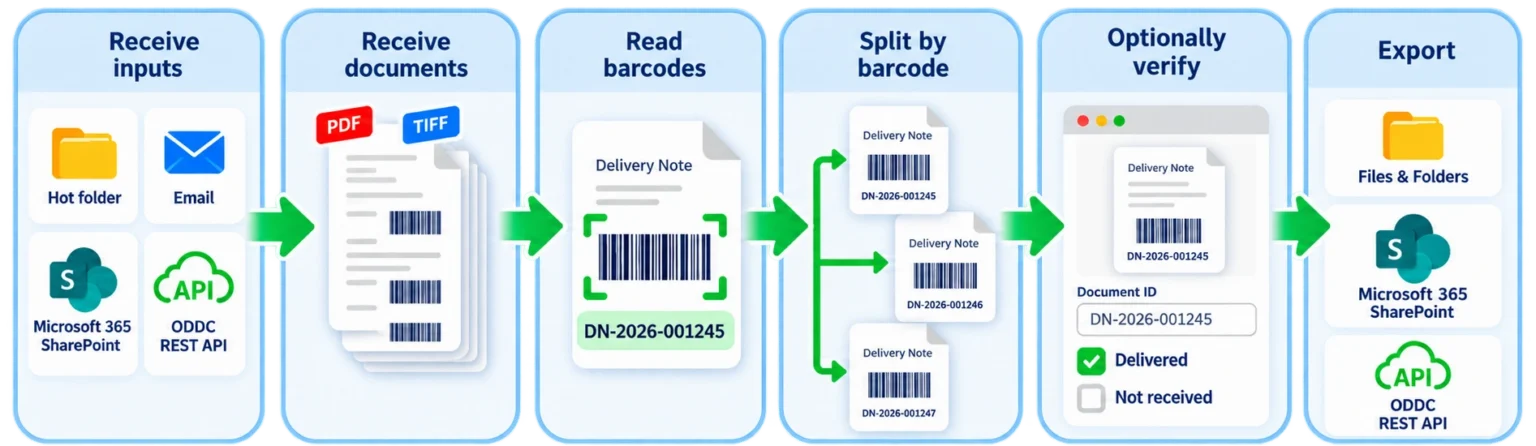
Oculens DDC Server – or simply ODDC Server – automatically separates scanned or digitally born PDF and TIFF files into individual documents, extracts the information you need, handles exceptions, and delivers ready-to-use files and data to your existing business systems. For many document-intensive workflows, that is exactly what is required.
You may already have an ERP system, document management system, line-of-business application, or custom software that knows what to do with the data. The missing piece is often much simpler: processing hundreds or thousands of incoming documents, identifying them reliably, and passing the results to that system.
Oculens DDC Server automates that step.
Often, the value of a single data field is enough.
Many business documents contain surprisingly little information that actually needs to be captured. A barcode may identify the transaction. A printed reference number may identify an existing record. Perhaps you also need a date, a few printed values, or several checkboxes. Your existing business application can take care of everything that follows. In situations like these, deploying a full-scale intelligent document processing or Document AI platform may introduce considerably more technology than the workflow requires.
Oculens DDC Server takes a more focused approach. It provides the document separation, barcode recognition, OCR, verification, integration, and processing capabilities required for predictable, high-volume document workflows — while workflow-specific data extraction can be added when you need something more.
In the simplest use case, Oculens DDC Server is barcode-based document splitter software.
Place a batch of scanned documents into an input location and Oculens DDC Server takes it from there. It can:
- detect barcodes on individual pages
- split a multi-document PDF or TIFF into separate documents
- use barcode values to identify and name the resulting files
- save completed documents to the configured destination
- route documents requiring attention to an exception workflow
- preserve the original processed input
- generate structured XML metadata alongside the resulting files
- optionally add searchable OCR text to PDF documents
The result is a repeatable document workflow that replaces manual splitting, renaming, sorting, and registration.
More than a document splitter
Oculens DDC Server is built around configurable projects and batches, allowing one server to run multiple document-processing workflows independently. Each project can have its own:
- input location
- output location
- processed-document location
- exception handling
- PDF or TIFF output format
- OCR configuration
- barcode recognition rules
- regular-expression rules
- separation method
This allows Oculens DDC Server to support several departments, document types, or business processes from the same installation.
Flexible document separation
Different document streams require different ways of determining where one document ends and another begins. Oculens DDC Server supports several separation methods.
Separator barcode
A specific barcode marks the beginning of a new document. This is ideal when cover pages, labels, or the first page of each business document contains a dedicated document identifier.
Barcode-flow value change
Several consecutive pages can contain the same barcode value and remain part of the same document. When the barcode value changes, Oculens DDC Server starts a new document.
Blank-page separation
Oculens DDC Server can also identify document boundaries using configurable blank-page detection.
Barcode rules
Regular-expression rules can be applied to barcode values, giving you control over which barcodes participate in document separation and how they are interpreted.
Receive documents from the systems you already use
Document processing does not have to begin with a watched folder. Oculens DDC Server can receive incoming documents from:
- shared or local file-system folders
- IMAP email accounts
- Microsoft 365 mailboxes
- Microsoft 365 SharePoint
- the ODDC REST API
This means documents can enter the processing workflow automatically instead of requiring someone to download, copy, rename, or manually prepare them first.
Deliver the results where they need to go
Processed documents can be delivered as PDF or TIFF files to:
- standard or shared file-system locations
- Microsoft 365 SharePoint
- applications integrated through the ODDC REST API
Oculens DDC Server can also generate XML metadata containing extracted and processing-related information, such as barcode values and document page boundaries.
Your downstream application can use this information to register, classify, route, archive, or otherwise continue processing the document.
OCR when you need searchable documents
Oculens DDC Server can apply OCR during document processing and create searchable PDF documents. Multiple recognition languages are supported.
Exceptions remain part of the workflow
Automation works well only when unusual documents can also be handled efficiently.
- A barcode may be damaged
- The first page may have been scanned without its identifier
- Pages may have been placed in the wrong order
- Two documents may have been scanned together
Oculens DDC Server includes a browser-based Verification UI for resolving cases like these.
Operators can:
- review documents requiring attention
- browse document pages using thumbnails
- open and inspect individual pages
- zoom and pan document images
- manually split documents
- remove incorrect pages
- delete documents
- enter or correct document data
- enter missing barcode values
- postpone a document for later review
The Verification UI supports multiple concurrent users, so exception processing can be distributed across a team.
Instead of breaking the automated workflow, exceptions remain inside a controlled document-processing process.
Integrate document processing into your own application
If your users already work in an existing business application, they do not necessarily need another application in front of them. The ODDC REST API allows your software to use Oculens DDC Server as a document-processing service. After authentication, an application can:
- retrieve available projects
- retrieve batches within a project
- upload images or documents to a selected batch
- check processing status
- retrieve completed output files.
This allows document capture and processing to operate behind your existing user interface and business process.
Designed for the workflows between paper and your business system
Oculens DDC Server is particularly suitable when:
|
You still have paper. |
Signed delivery notes, service reports, forms, warehouse documents, production paperwork, administrative documents, or other records still need to be printed, transported, completed, signed, or returned. |
|---|---|
|
You already have the business system. |
Your ERP, DMS, workflow system, or line-of-business application already handles the transaction once it receives the correct identifier and document. |
|
The documents carry relatively small amount of data. |
Perhaps all you need is a barcode. Or a barcode plus a printed reference number, date, or several checkboxes. |
|
The document volume is high. |
Processing a few documents manually is easy. Processing hundreds or thousands every day is not. |
Oculens DDC Server is designed for exactly this gap.
Do You Face Similar Document Processing Challenges?
Many Oculens DDC Server projects start with a very practical problem: the business process already exists, the back-end system already works, but paper documents still have to be scanned, identified, separated, and returned to that system. These are typical examples:
“Our signed partner agreements come back on paper.”
Each agreement already contains a barcode with the case or contract ID. You scan the returned agreements, but they need to be separated into individual PDF files and linked back to the correct record in your existing contract management system. Oculens DDC Server detects the barcode, separates the scanned batch into individual agreements, names or identifies each document using the barcode value, and prepares the output for your existing contract management process. You reduce manual document splitting and indexing while keeping your current contract management system unchanged.
“Our delivery notes come back on paper.”
Every delivery note already has a barcode printed on it. After scanning, each document must be identified and returned to the corresponding transaction in your existing enterprise system. Oculens DDC Server automatically reads the barcode, separates large scan batches into individual delivery notes, and provides the document and barcode data to your downstream system. You can process large volumes of returned delivery notes faster, with less manual sorting and registration.
“We need to process forms returned by our couriers.”
Each form contains several barcodes, an indication of whether delivery was successful or unsuccessful, and the recipient’s signature. You need to identify the transaction, capture the relevant delivery status, and retain the signed document. Oculens DDC Server can use the relevant barcode for document identification and separation, while a custom data-capture module can be added to capture the delivery-status field required by your process. You automate both document identification and the small amount of additional data capture your business process actually needs.
“A large number of payment slips come back every day.”
You receive stacks of payment slips and only need one piece of information from each document: the printed serial number in the corner. Oculens DDC Server can process the scanned documents and, with a workflow-specific data-capture module, extract the printed serial number required by your back-end system. You replace repetitive manual keying with automated capture of the one field that matters.
“We manufacture and ship from two countries, using two different delivery-note formats.”
The delivery notes from both countries are collected and processed at the same location. The layouts are different, but in both cases you need the printed serial number to identify which shipments were successfully delivered. We can configure or extend Oculens DDC Server to process both document layouts and capture the relevant printed serial number from each format. You can standardize the downstream processing of two different document formats without changing the operational systems used in either country.
“We apply barcode labels to incoming applications before scanning them.”
At the mailroom, you attach a barcode label to each incoming application. The document is immediately registered in your system using a handheld barcode scanner, but the actual document is scanned only later. At that point, you need the scanned batch separated into individual applications and the same barcode value recovered from each document. Oculens DDC Server detects the barcode labels during scanning, automatically separates the batch into individual documents, and provides the barcode value required to match each scanned application with the record created earlier. You connect the physical mailroom process with the later scanning process without having to manually identify and split each document again.
Straightforward capacity-based licensing
Oculens DDC Server licensing is based primarily on processed page volume. Different licensing models are available, including time-limited page capacity and perpetual-style annually renewed page capacity. The software is activated online and the activated license is tied to the licensed server hardware.
Why Oculens DDC Server?
Focused on what the workflow actually needs. Not every document workflow requires sophisticated document understanding, extensive AI models, or a full-scale intelligent document processing platform. For many organizations, the requirement is more practical:
- Receive the documents
- Separate them
- Read the identifier
- Capture the few values that matter
- Resolve the exceptions
- Pass the result to the business system
That is where Oculens DDC Server is strongest. It gives you a focused document-processing layer between incoming paper or digital documents and the systems that already run your business.
From paper to usable business data — without unnecessary complexity.
Your business system may already handle everything that happens after a document has been identified. Oculens DDC Server handles the document-processing step in between.
Split the documents. Capture what matters. Handle the exceptions. Deliver the result.
That can be enough to make a substantial difference in a document-intensive business process.
Frequently Asked Questions
What is Oculens DDC Server?
Oculens DDC Server is on-premises document processing and barcode document splitter software. It automatically separates PDF and TIFF document batches, recognizes barcodes, applies configurable processing rules, optionally performs OCR, handles exceptions, and delivers processed documents and metadata to downstream systems.
What is barcode document splitting?
Barcode document splitting automatically divides a scanned multi-document batch into individual documents based on barcodes found on its pages. Oculens DDC Server can split at separator barcodes, when barcode values change, or according to other configured rules.
Do I need an intelligent document processing platform to automate scanned documents?
Not necessarily. If your documents already contain reliable identifiers such as barcodes and you only need to capture a limited number of additional values, a focused solution such as Oculens DDC Server may provide the automation you need without the complexity of a full-scale intelligent document processing platform.
Can Oculens DDC Server process documents received by email?
Yes. Oculens DDC Server can receive documents from IMAP and Microsoft 365 mailboxes and automatically pass incoming attachments into configured document-processing workflows.
Can Oculens DDC Server work with Microsoft 365 SharePoint?
Yes. Oculens DDC Server can use Microsoft 365 SharePoint as a document source and can export processed documents to SharePoint.
Does Oculens DDC Server provide an API?
Yes. The ODDC REST API allows authenticated applications to retrieve projects and batches, upload documents, monitor processing status, and download completed results.
Can users correct documents that cannot be processed automatically?
Yes. Oculens DDC Server includes a multi-user browser-based Verification UI where operators can inspect pages, manually separate documents, delete pages, enter missing information, correct document data, and complete exception cases.
Can Oculens DDC Server extract data in addition to barcodes?
Yes. Barcode processing is a core capability, and OCR can be used for searchable documents. Workflow-specific data-capture modules can also be developed when you need to extract selected printed fields or other structured information.
What types of organizations are a good fit for Oculens DDC Server?
Oculens DDC Server is particularly well suited to businesses and public-sector organizations that already have an operational back-end system but still process large volumes of paper or scanned documents. It is especially effective when documents contain reliable identifiers and only a limited amount of additional data needs to be captured.
How much does Oculens DDC Server cost?
Oculens DDC Server is available from EUR 450, including an annual processing capacity of 50,000 pages. Higher processing capacities and other licensing options are available for larger document volumes.