Extend Oculens DDC Server around the way your documents actually work
Custom document processing
Extend Oculens DDC Server for the logistics documents you actually process
If your logistics workflow already uses barcodes, delivery note numbers, printed references, or a few status checkboxes, you may not need a large document processing platform. You may simply need the scanned document to be identified, the key values to be captured, and the result to be passed back to your existing logistics, ERP, warehouse, or transport system. That is where custom Oculens DDC Server processing jobs fit.
Typical logistics scenarios
You may recognize situations like these:
- returned delivery notes need to be matched to the original shipment
- the delivery note number has to be read from the scanned document
- a checkbox shows whether the shipment was delivered successfully
- another checkbox indicates that the recipient refused the delivery
- several document layouts are used across different countries or branches
- documents arrive as scanned PDFs, TIFF files, or smartphone photos
- the back-end system already contains the order or shipment data, so only a few values need to be captured from the document
In these cases, Oculens DDC Server can be extended with a custom processing job that captures exactly the information your business process needs.
Read the values that matter
A custom Oculens DDC Server processing job can be developed to extract data such as:
- delivery note number
- shipment or consignment reference
- order number
- customer or partner reference
- printed identifiers
- delivery status, “Delivered”, “Not accepted” etc. checkboxes
- other workflow-specific status fields
The captured values can then be returned together with the processed document and passed to the business system that already manages the shipment or transaction.
Use the document to update the business process
The value of the solution is not simply that a number or checkbox can be recognized. The real benefit is what happens next.
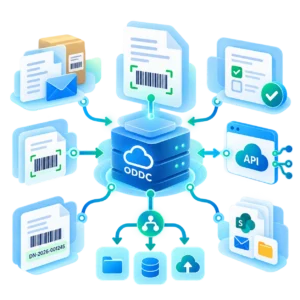
For example, your system may already know that shipment DN-2026-001245 was dispatched. When the signed delivery note comes back, Oculens DDC Server can identify the document, read the delivery note number, capture the relevant status, and provide the result to your existing system. That allows the business process to continue automatically. Instead of an employee opening the document, finding the reference number, checking the delivery status, and entering the information manually, the document can become structured input for the system you already use.
Smartphone photos can be part of the process too
Logistics documents do not always come back as clean scanner images. Drivers, field staff, or partners may return documents as smartphone photos or other imperfect images. Where required, we can extend custom processing jobs that prepare these images for recognition and extract the values needed by the workflow.
This can be useful when signed delivery notes, proof-of-delivery documents, service forms, or other field documents need to enter the back-end process quickly without waiting for centralized scanning.
Different document layouts do not always require a large platform
You may use different delivery note layouts across countries, business units, warehouses, or partners. If the requirement is still focused — for example, identify the document, read the delivery note number, and capture a few status fields — a custom Oculens DDC Server job can often handle the variation without introducing a full-scale intelligent document processing platform.
The goal is not to understand every element on the page. It is to capture the few values that allow your existing business system to continue the process.
Focused data capture for existing business systems
Modern ERP, logistics, warehouse, and transport systems often already contain most of the information required to manage the transaction. The returned document usually needs to contribute only a small amount of new information.
- A barcode
- A machine-printed delivery note number
- A status checkbox zone
- Perhaps one or two additional printed fields
For workflows like these, a focused Ocules DDC Server-based solution can provide the right level of automation without unnecessary complexity.
Tailored for your documents
Custom Oculens DDC Server processing jobs are developed specifically for your document types and business requirements. The process starts with a short consultation in which we review:
- representative document samples
- the values you need to capture
- expected document volumes
- image quality and input sources
- the required status or validation rules
- where the extracted data needs to go
We then define the solution and prepare a commercial proposal. Development starts after the scope is agreed and the project is contracted.
Usually a focused development project
Custom Oculens DDC Server work is billed according to the required consulting and development days. For many typical business requirements, 5–10 professional service days are usually sufficient to design, develop, test, and deliver the required custom processing job. The actual effort depends on the number of document layouts, image quality, extraction requirements, validation logic, and integration needs. Using a custom job on the ready-to-use Oculens DDC Server requires only a one-time investment on the user’s part; there is no annual fee.
Capture only what the process needs
If your back-end system already knows the shipment, order, customer, or transaction, there is often no reason to extract everything from the document.
Oculens DDC Server can identify the document, capture the few values that matter, and return the result to the business process you already have.